Glanterd: Integrating Glitch Typography into Professional Design Workflows
In the current digital landscape, visual uniformity has become a significant challenge for brands and creators. As design systems standardize across platforms, standing out requires more than just bold colors or large images; it demands a distinct typographic voice. Glanterd emerges as a strategic solution for designers seeking to break this monotony. It is not merely a decorative font but a functional tool for injecting controlled chaos into structured layouts. By understanding how to integrate this glitch typeface into your broader creative process, you can elevate projects from generic to memorable without sacrificing readability or brand integrity.
Understanding the Role of Glanterd in Visual Communication
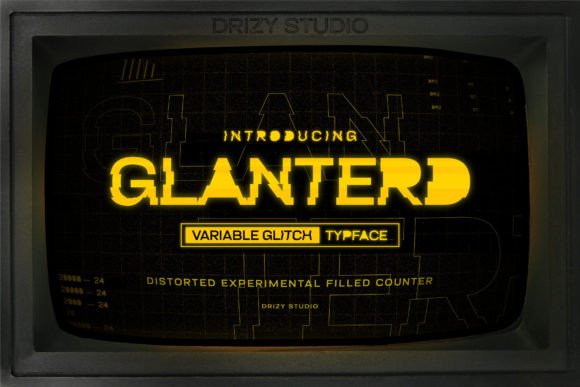
Glanterd is defined by its unconventional structure, characterized by distortion, fragmentation, and a sense of digital decay. Unlike traditional serif or sans-serif families that prioritize clarity above all else, Glanterd prioritizes impact. It fits into the broader design ecosystem as a display typeface, meant for headlines, logos, and short-form copy rather than body text. Its primary function is to arrest attention and convey a specific mood—often one of urgency, modernity, rebellion, or technological sophistication.
When evaluating where Glanterd fits in your toolkit, consider it alongside other high-impact assets. Just as a photographer might use high-contrast lighting to create drama, a designer uses Glanterd to create visual tension. This tension is useful in industries such as music, gaming, fashion, and tech startups, where breaking norms is part of the brand identity. However, its utility extends beyond these niches. Any project requiring a departure from corporate stiffness can benefit from the strategic application of glitch aesthetics.
Pre-Production: Planning and Compatibility Checks
Before implementing Glanterd into a live project, proper preparation is essential. The first step involves assessing compatibility with your existing brand guidelines. If your brand relies on strict minimalism, introducing a glitch font may require a phased approach. Start by identifying specific touchpoints where experimentation is permitted, such as social media campaigns, event posters, or limited-edition product packaging.
Technical compatibility is another critical factor. Ensure that the file formats provided with Glanterd (typically OTF or TTF) are supported by your design software, whether you are using Adobe Creative Cloud, Figma, or open-source alternatives like GIMP. Additionally, consider the output medium. Glitch effects render differently on screens versus print. On digital displays, the sharp edges and distortions of Glanterd can appear crisp and dynamic. In print, however, fine details may blur depending on the paper quality and printing resolution. Conducting small-scale tests before full production saves time and resources.
Integration Strategies During the Design Process
Once you have cleared the preparatory hurdles, the next phase is integration. The most effective way to use Glanterd is through contrast. Pairing it with a clean, neutral sans-serif font creates a balanced hierarchy. The stability of the secondary font grounds the viewer, allowing the chaotic energy of Glanterd to shine without overwhelming the message. This juxtaposition is key to maintaining professionalism while embracing creativity.
- Hierarchy Management: Use Glanterd exclusively for H1 and H2 headers. Keep body copy simple to ensure readability.
- Color Interaction: Glitch fonts often interact well with high-contrast color palettes. Neon accents against dark backgrounds can enhance the digital distortion effect.
- Spacing and Kerning: Due to its irregular shapes, Glanterd may require manual kerning adjustments. Do not rely on default spacing settings; tweak letter pairs to ensure visual cohesion.
Another practical implementation tip is to use Glanterd as a texture rather than just text. By overlapping the typeface with images or using blending modes in your design software, you can create complex composite images. This technique is particularly effective in web design hero sections, where the goal is to create an immediate emotional response. The font becomes part of the visual narrative, interacting with other elements to tell a story of disruption and innovation.
Workflow Efficiency and Asset Organization
Introducing a specialized typeface like Glanterd into your workflow requires disciplined asset management. To maintain efficiency, create a dedicated folder for glitch-style assets, including Glanterd, complementary textures, and color swatches. This organization allows for quick access during tight deadlines. Furthermore, if you work in a team, document the usage rules for Glanterd in your internal style guide. Specify clear do’s and don’ts, such as minimum size requirements and prohibited background colors. This ensures consistency across different designers and prevents the dilution of the font’s impact through misuse.
For freelancers and agencies managing multiple clients, template creation is a valuable time-saver. Develop master templates in your preferred design tools that already have Glanterd integrated into header styles. This reduces setup time for new projects and ensures that the technical aspects, such as line height and alignment, are pre-configured for optimal results. Over time, this library of templates becomes a significant productivity asset, allowing you to focus on creative refinement rather than repetitive setup tasks.
Quality Control and Long-Term Usability
As with any design element, quality control is paramount. Before finalizing any project featuring Glanterd, conduct a thorough review across multiple devices and screen sizes. What looks striking on a desktop monitor may appear cluttered on a mobile device. Responsive design principles apply to typography as well. You may need to create simplified versions of your headlines for smaller screens, perhaps reducing the complexity of the glitch effect or increasing the font size to maintain legibility.
Long-term usability also depends on avoiding trend fatigue. While glitch art has gained popularity, it risks becoming cliché if overused. To keep your designs fresh, rotate Glanterd with other expressive typefaces. Use it sparingly for high-impact moments rather than as a default choice. This strategic restraint preserves the font’s power and ensures that when it does appear, it retains its ability to surprise and engage the audience. Regularly audit your past projects to see how Glanterd performed in terms of user engagement and feedback. Use these insights to refine future applications.
Expanding Beyond Static Design
The versatility of Glanterd extends into motion graphics and video editing. In video workflows, the static distortion of the font can be animated to create a flickering or shifting effect. This adds a layer of dynamism that static images cannot achieve. Tools like After Effects or Premiere Pro allow you to keyframe the position and opacity of Glanterd text, syncing it with audio beats or visual transitions. This integration is particularly effective in intro sequences, lower thirds, and promotional videos where energy and pace are crucial.
For educators and content creators, using Glanterd in thumbnails and title cards can significantly improve click-through rates. The human eye is drawn to irregularity and movement. By incorporating this typeface into your visual branding, you signal that your content is modern and engaging. However, always balance this with clarity. The title must still be readable at a glance. Test different variations to find the sweet spot between artistic expression and functional communication.
Final Thoughts on Strategic Implementation
Successfully integrating Glanterd into your work is not about applying a filter; it is about making deliberate design choices that align with your project’s goals. It requires a understanding of contrast, hierarchy, and audience expectation. By treating this glitch font as a specialized tool within a broader workflow, you can enhance your creative output without compromising professional standards. Whether you are designing a website, crafting a marketing campaign, or producing video content, Glanterd offers a unique way to cut through the noise. The key lies in preparation, thoughtful pairing, and rigorous quality control. When used with intention, it transforms from a simple font into a powerful component of your visual identity.