Pixel Chuckler: A Practical Guide to Using Whimsical Pixel Art Typography
In the crowded landscape of digital design, finding a typeface that balances nostalgia with modern usability can be surprisingly difficult. Many designers rush toward generic retro fonts, only to find their projects lack character or fail to render correctly across different platforms. This is where Pixel Chuckler emerges as a distinct solution. It is not merely a collection of blocky letters; it is a carefully crafted tool designed to inject genuine whimsy into creative endeavors without sacrificing technical reliability. Whether you are a seasoned graphic designer or a small business owner managing your own social media, understanding how to properly leverage this font can save you time and elevate your visual communication.
Understanding the Core Appeal of Pixel Chuckler
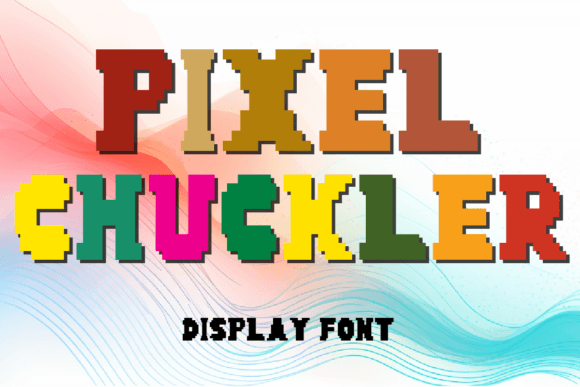
At its heart, Pixel Chuckler is a quintessential pixel art style font. It captures the essence of early digital aesthetics—the kind that reminds us of 8-bit gaming consoles and vintage computer interfaces—but refines it for contemporary use. The package includes 26 capital letters and numbers 0 through 9, providing the essential building blocks for headlines, logos, and short-form text. What sets it apart is its intentional charm. It does not try to mimic high-resolution serif elegance; instead, it embraces its digital roots to create a playful spirit that resonates with audiences looking for authenticity and fun.
The inclusion of both OTF (OpenType Font) and TTF (TrueType Font) files is a critical detail often overlooked by beginners. These formats ensure seamless compatibility with a vast array of design software, from industry standards like Adobe Photoshop and Illustrator to free alternatives like GIMP or Canva. This versatility means you are not locked into a specific ecosystem, allowing you to move your assets freely between web design projects, print materials, and digital illustrations.
Common Mistakes When Using Retro-Style Fonts
While Pixel Chuckler is user-friendly, many creators make avoidable errors that diminish the impact of their work. Recognizing these pitfalls early can prevent frustration and ensure your final output looks professional rather than amateurish.
Mistake 1: Ignoring Readability in Long Text Blocks
One of the most frequent missteps is using pixel art fonts for body text. Pixel Chuckler is designed for impact, not endurance. Its blocky structure, while charming, becomes visually exhausting when used for paragraphs or detailed instructions. Readers may struggle to distinguish individual characters at smaller sizes, leading to poor user experience on websites or unreadable printed flyers.
Better Approach: Reserve Pixel Chuckler for headlines, logos, buttons, and short captions. Pair it with a clean, highly legible sans-serif font for body copy. This contrast creates a hierarchy that guides the eye while maintaining the playful tone you desire.
Mistake 2: Overlooking File Format Compatibility
Some users download only one file type, assuming it will work everywhere. While modern operating systems handle both OTF and TTF well, specific web browsers or older design tools may prefer one over the other. Ignoring this can lead to formatting issues where the font fails to load, defaulting to a standard system font that ruins your design layout.
Better Approach: Always keep both OTF and TTF files in your project folder. If you are designing for the web, consider converting the font to WOFF or WOFF2 formats for faster loading times and better browser support, ensuring your pixel-perfect masterpieces appear exactly as intended on every device.
Mistake 3: Misapplying the Tone
Pixel Chuckler exudes whimsy and playfulness. Using it for serious corporate reports, legal documents, or somber announcements creates a cognitive dissonance that undermines your message. Audiences may perceive the brand as unprofessional or out of touch if the typography does not match the context.
Better Approach: Evaluate the emotional goal of your project. If you are creating gaming graphics, children’s educational materials, or casual social media posts, this font is ideal. For formal communications, choose a more traditional typeface. Knowing when not to use a font is just as important as knowing when to use it.
Maximizing Versatility Across Creative Fields
The true power of Pixel Chuckler lies in its adaptability. It is not limited to a single niche. Here is how different creators can apply it effectively:
- Gaming Developers: Use it for in-game UI elements, scoreboards, or title screens to evoke nostalgia and enhance immersion.
- Social Media Managers: Create eye-catching quote graphics or event announcements that stand out in a feed dominated by sleek, minimalist designs.
- Educators: Design engaging worksheets or presentation slides that capture students’ attention without appearing childish.
- Small Business Owners: Add a unique charm to packaging labels or storefront signage for boutiques, cafes, or toy shops.
By integrating Pixel Chuckler into these varied contexts, you inject a playful spirit that captivates audiences. It transforms ordinary designs into memorable experiences, encouraging viewers to pause and engage with your content.
What to Check Before You Start Designing
Before you commit to using Pixel Chuckler in a major project, take a moment to verify a few practical details. This due diligence ensures smooth workflow and high-quality results.
- License Verification: Always review the licensing terms associated with the font. Ensure your intended use—whether personal, commercial, or client-based—is covered. This avoids potential legal issues down the line.
- Character Set Limitations: Remember that Pixel Chuckler includes 26 capital letters and numbers 0-9. It does not include lowercase letters or special symbols. Plan your copy accordingly, using all caps for stylistic consistency, or combine it with another font if lowercase is required.
- Scaling Behavior: Pixel art fonts rely on grid alignment. Test how the font looks at different sizes. Sometimes, scaling non-integer multiples can cause blurring or anti-aliasing artifacts. Keep your design elements aligned to pixel grids where possible to maintain crisp edges.
Elevating Your Designs with Intentional Choices
Choosing a font is more than picking a pretty shape; it is about making a strategic decision that supports your communication goals. Pixel Chuckler offers a timeless appeal that transcends fleeting trends. Its digital treasure trove of potential allows you to create work that feels both nostalgic and fresh.
When you avoid common mistakes like poor readability or tonal mismatch, you unlock the full value of this tool. You save time by not having to fix formatting errors later, and you enhance satisfaction for your audience by delivering clear, charming visuals. Whether you are enhancing your social media presence or crafting a complex digital illustration, this font serves as a reliable partner in your creative process.
Ultimately, the goal is to transform your creations into pixel-perfect masterpieces that bring a smile to everyone’s face. By approaching Pixel Chuckler with a clear understanding of its strengths and limitations, you ensure that every project benefits from its unique charm. Unleash your creativity, but do so with precision. Let the whimsical nature of the font guide your aesthetic, while your practical knowledge ensures professional execution. This balance is what separates good design from great design, making your work not just seen, but remembered.